 COSMIC
PATTERNS SOFTWARE, INC.| WWW.ASTROSOFTWARE.COM
COSMIC
PATTERNS SOFTWARE, INC.| WWW.ASTROSOFTWARE.COM
 HOME HOME |
PRODUCTS | SERVICES | INFORMATION/EDUCATION | COMPANY | PURCHASE | CONTACT US |
 ABOUT
KEPLER ABOUT
KEPLER |
|
KEPLER SCREENS AND CHARTS: CHART WHEEL SAMPLES: OTHER EXCITING FEATURES: |
| WHY
CHOOSE KEPLER? |
 PURCHASE
KEPLER PURCHASE
KEPLER |
|

 Kepler can
be used by people with any level of experience, from novice to professional.
Novices can stick to the basics, experts use the advanced features. Complete
atlas included. Kepler can
be used by people with any level of experience, from novice to professional.
Novices can stick to the basics, experts use the advanced features. Complete
atlas included. |
KEPLER'S CHARTS AND SCREENS: (Page 2
|
Continuation:
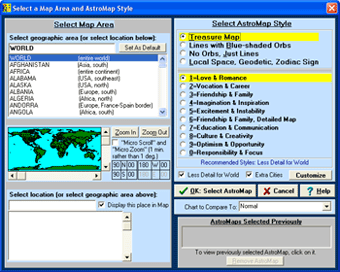 Selecting
AstroMap: Simply click on the AstroMap
icon to see a list of different AstroMaps. After selecting "AstroMap" the
screen "Select a Map" area is displayed. You can
select place that you want to use on the left and the geographic
region selected is seen in a preview on the left side of the
screen. In the upper-right corner you select the kind of map
desired: Just Lines, Map with Blue-Shaded Orbs, Treasure Map,
Local Space, Geodetic, and Zodiac Sign map. Which aspects and
planets are selected just below this. In the above example, "Treasure
Map" is selected. Selecting
AstroMap: Simply click on the AstroMap
icon to see a list of different AstroMaps. After selecting "AstroMap" the
screen "Select a Map" area is displayed. You can
select place that you want to use on the left and the geographic
region selected is seen in a preview on the left side of the
screen. In the upper-right corner you select the kind of map
desired: Just Lines, Map with Blue-Shaded Orbs, Treasure Map,
Local Space, Geodetic, and Zodiac Sign map. Which aspects and
planets are selected just below this. In the above example, "Treasure
Map" is selected.With the traditional AstroMap, you cannot see exactly how far away from the line the influence extends. The AstroMap style with blue-shaded orbs solves this problem by displaying a blue-shaded area around each aspect line that shows how far each aspect line extends. These blue-shaded areas clearly indicate how far the astrological influence extends. The Treasure Map is a very useful and exciting alternative to the other 2 AstroMap styles. There are 10 different Treasure Map styles: Love and Romance, Vocation and Career, Friendship and Family, Imagination and Inspiration, Excitement and Instability, Education and Communication, Culture and Creativity, Optimism and Opportunity, Responsibility and Focus, and the Detailed Friendship and Family Treasure Map. Each of these maps shows all of the astrological influences that are relevant to that area of life.
|
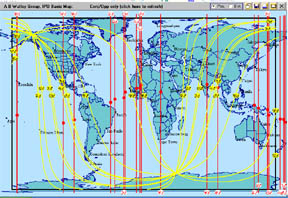 AstroMap
Displayed on the Screen: When
viewing a large area, such as the entire world, it is best
to pick out the most conspicuous areas, those areas that
have conjunctions and oppositions to the Asc and MC.
AstroMap
Displayed on the Screen: When
viewing a large area, such as the entire world, it is best
to pick out the most conspicuous areas, those areas that
have conjunctions and oppositions to the Asc and MC.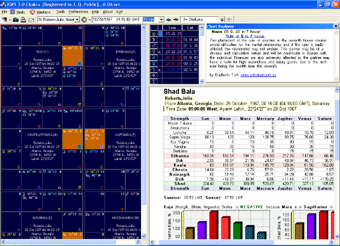 Kepler
Workshop Main Screen: Kepler Workshop can produce
the following: the Graphic Ephemeris, Planets Text Ephemeris,
Asteroids Text Ephemeris, Eclipse Maps, Solar and Lunar
Eclipse Listings, Sky Map, Star Catalogue, Moon Calendar,
Vedic: Charts and Vargas, Vedic: Transits (Gochara), Ashtakavarga,
and Vedic: Dasas and Bhuktis
Kepler
Workshop Main Screen: Kepler Workshop can produce
the following: the Graphic Ephemeris, Planets Text Ephemeris,
Asteroids Text Ephemeris, Eclipse Maps, Solar and Lunar
Eclipse Listings, Sky Map, Star Catalogue, Moon Calendar,
Vedic: Charts and Vargas, Vedic: Transits (Gochara), Ashtakavarga,
and Vedic: Dasas and Bhuktis